

How to Choose the Best X Ray Security Scanner
Choosing an X Ray Security Scanner is a practical decision about more than image quality. The right system should fit the items being screened, the available space, and the pace of daily operations. A compact unit may suit a reception area, while a busy facility may need a wider conveyor and a workflow designed for steady traffic. Small details matter. Measure the largest typical item, check the scanner’s opening size, and consider where staff will stand and review images.
Technical specifications deserve careful review, but they should be considered alongside support and training. Ask how image display settings work, what routine maintenance involves, and how quickly service is available in your region. Request a live demonstration using representative, permitted test objects. Notice whether operators can interpret images clearly and move through the process without unnecessary delays. Easy to overlook.
A reliable comparison also looks at installation requirements, operating costs, warranty terms, and compatibility with existing procedures. Independent testing records and clear documentation can help buyers assess a vendor’s claims. Still, a polished brochure cannot show every real-world constraint. A scanner that performs well in a demonstration may feel different during a crowded shift. That is worth examining. This guide outlines the questions that help organizations compare options with care, involve experienced operators, and select equipment suited to their actual screening environment.
Understand X-Ray Security Scanner Types and Applications
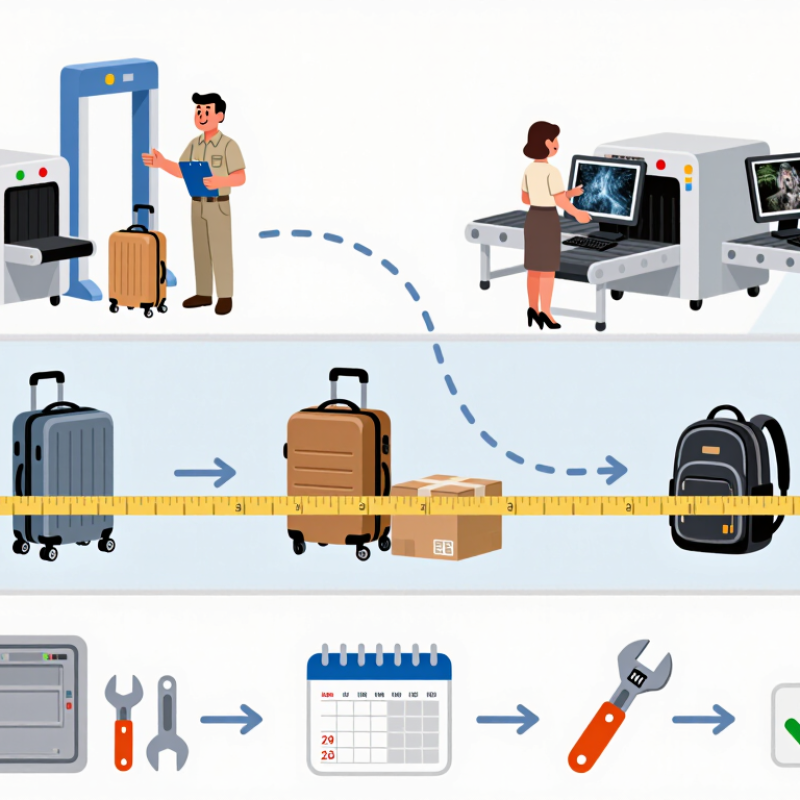
X-ray security scanners differ mainly in chamber size, viewing angle, and how items move through inspection. Conveyor systems suit steady flows of bags, parcels, or boxed supplies at entrances and loading areas. Cabinet-style units handle smaller objects, such as tool cases, sample containers, or personal electronics, in clinics and offices. Dual-view systems capture two angles, helping operators inspect overlapping shapes without repeatedly repositioning an item. Some sites need mobile units, but wheels and compact frames do not automatically make setup simple. Power access matters.
A useful choice starts with the objects being screened, not the scanner’s maximum image resolution. Measure typical item dimensions, peak hourly volume, available floor space, and the distance operators must move items. A busy venue may value fast belt speed, while a laboratory may need finer detail and careful handling. Both are trade-offs. Ask how images are displayed and reviewed, and whether staff can receive recurring, role-specific training. Check shielding, warning indicators, and interlocks during routine safety reviews. I would not treat a feature list as proof of fit. A short site trial can reveal awkward belt height, glare, or queues that a brochure misses. Small details count.
Define Security Requirements and Screening Volume
A scanner should match the site’s actual security tasks, not just its floor plan. Define what needs inspection, the largest items, required image detail, and how operators will handle alarms. Then measure screening demand by hour, shift, and season. TSA reported screening about 858 million travelers in 2023, while ACI World estimated global airport passenger traffic at 8.7 billion that year and forecast 9.4 billion for 2024. These figures show broad demand, but they cannot replace local counts. A busy Monday morning may matter more than the daily average.
Tips: Count peak-hour items at the intended checkpoint. Record queue length, average inspection time, and staffing levels. Ask suppliers to demonstrate throughput using representative bags and operating conditions, not just headline rates. Leave room for growth, but avoid paying for capacity your site cannot use.
Also check whether the scanner’s tunnel size, belt speed, image display, and network connections fit the workflow. Confirm who reviews images and how unusual or unclear scans are escalated. A tidy spreadsheet can still miss a messy shift change; observe real operations before finalizing specifications. Revisit assumptions after installation, because demand patterns and staffing can change. A small pilot may reveal bottlenecks that a paper estimate misses.
Compare Imaging Quality, Detection, and Safety Features
A useful X-ray security scanner should produce images that operators can interpret consistently, not merely sharp-looking pictures. Check whether dense and overlapping objects remain distinguishable on the display. Ask for sample images captured under realistic conditions, including varied package sizes and routine workflow speeds. Screen brightness, image zoom, and clear controls also matter during long shifts. Small labels can blur. That can slow review.
Detection performance depends on more than image resolution. Look for adjustable image tools, clear alerts, and settings suited to the items and volumes being screened. Ask how the system handles dense areas and how often operators need to resolve uncertain results manually. Compare performance using the same evaluation criteria across models. A brief demonstration may not reflect a busy site, so request a longer trial when possible. Detection is never perfect; good procedures and trained staff remain essential.
Safety features deserve close inspection. Confirm that the cabinet is intact, access points are protected, and warning indicators are easy to see. Ask about safety interlocks, routine inspections, and documented maintenance. Operators should receive practical training on safe positioning and daily checks. Review the manufacturer’s technical documentation with a qualified radiation-safety professional. A confusing manual is a real weakness, even if the images look excellent.
Assess Site Compatibility, Integration, and Compliance
How to Choose the Best X Ray Security Scanner
Assess Site Compatibility, Integration, and Compliance
A scanner that fits the specification sheet may still be wrong for the site. Measure doorways, corridor turns, ceiling height, and the floor area needed for routine access. Check the unit’s weight against floor-loading limits, especially on raised floors. Small details matter. A neat floor plan can still mislead when queues form beside the inspection point.
Consider how the scanner will connect with existing procedures and systems. Confirm available power, network access, and space for operators to review images without obstructing foot traffic. Ask how maintenance, software updates, training, and technical support will work in practice. Test the proposed workflow with the people who will use it. Their feedback may reveal awkward handoffs or delays that a formal plan misses. That is worth correcting early.
Compliance needs more than a checkbox. Ask suppliers for clear technical documentation, operating guidance, and evidence relevant to applicable safety and performance requirements. Confirm who is responsible for installation checks, staff training, and ongoing records. Requirements can vary by location and application, so verify them with qualified safety and compliance professionals. Keep the review documented. It may feel tedious, but unclear responsibility can create avoidable gaps. Revisit the assessment when the site layout or operating process changes.
| Assessment Area | What to Check | Evidence or Measurement | Selection Guidance |
|---|---|---|---|
| Site and item compatibility | Check the tunnel or inspection opening, conveyor height, item dimensions and weight, and available floor space. | Compare the scanner’s published opening and load limits with the largest and heaviest items expected in normal operation. | Choose a configuration that accommodates real operating loads while leaving adequate space for access, maintenance, and safe movement around the unit. |
| Throughput and workflow | Assess expected peak volume, conveyor speed, item spacing, operator review time, and procedures for alarms or re-screening. | Request throughput information for the intended operating conditions and test the full process, including image review and exception handling. | Do not compare headline conveyor speeds alone; effective capacity also depends on item size, spacing, screening procedures, and staffing. |
| Image quality and detection task | Confirm that image tools and penetration performance suit the objects, packaging, and threat categories relevant to the site. | Evaluate representative test items, image clarity, operator controls, and training requirements in a trial or acceptance test. | Select against documented screening requirements and operator performance, rather than relying on a single image-resolution or penetration figure. |
| Building and utility readiness | Review power supply, electrical load, network coverage, ventilation, environmental conditions, delivery route, and installation access. | Use the installation drawings and technical requirements to check the route from receiving area to operating location and confirm site utilities. | Resolve space, power, and access constraints before purchase; installation changes can affect cost, schedule, and operations. |
| Systems integration | Determine whether screening results, alarms, and operational status need to connect to local security, baggage, parcel, or facility systems. | Request interface documentation, supported network options, data formats, access controls, and any required licensing or integration components. | Confirm interoperability with the actual systems and workflows in use; verify that any claimed interface is available for the selected configuration. |
| Cybersecurity and data handling | Review user roles, authentication, network exposure, software updates, log retention, and storage or export of screening data. | Obtain security documentation and verify available controls with the organization’s IT or cybersecurity team. | Set data access and retention rules before deployment, especially where images or inspection records may contain sensitive information. |
| Radiation and regulatory compliance | Identify the rules that apply to the location, application, equipment type, installation, operation, and personnel. | Request applicable conformity documents, radiation-safety information, operating instructions, and required inspection or maintenance records. | Confirm requirements with the relevant regulator or qualified radiation-safety professional; obligations differ by jurisdiction and use case. |
| Operational safety | Check shielding, interlocks, warning indicators, emergency controls, access restrictions, and safe procedures for clearing jams. | Review the safety documentation and verify that installation, commissioning, and operator training cover the site’s procedures. | Ensure safety features are suitable for the installation and that staff know how to respond to faults, alarms, and maintenance needs. |
| Service and lifecycle support | Assess preventive maintenance, calibration or performance checks, spare-parts availability, technical support, and software support period. | Review service terms, response targets, maintenance schedules, training options, and total operating costs over the planned service life. | Compare the full lifecycle plan, not just purchase price; confirm who performs required service and how downtime is managed. |
| Acceptance and staff readiness | Define commissioning checks, acceptance criteria, operator training, escalation paths, and ongoing competency reviews. | Create a written test plan covering site fit, interfaces, safety functions, representative items, and required records. | Agree on measurable acceptance criteria before delivery and ensure trained staff are available before live screening begins. |
Evaluate Total Cost, Maintenance, and Vendor Support
A purchase quote is only the visible part of an X-ray scanner’s cost. NIST Handbook 135-2022, the Federal Energy Management Program’s life-cycle costing manual, recommends assessing costs across an asset’s service life, not just at acquisition. Include installation, operator training, software updates, energy, preventive maintenance, parts, and eventual replacement. Make assumptions explicit.
Use a simple five-year stress test. For a $100,000 scanner, annual service priced at 8% of purchase cost adds $40,000 before inflation or discounting. That is an example, not an industry benchmark. Compare it with the vendor’s written service rates and expected parts schedule. Small details matter: a replacement belt, detector component, or overnight technician visit can change the budget. I would not treat a spreadsheet estimate as fact; local labor and shipping can make it wrong.
Maintenance terms deserve close reading. Ask how often calibration and inspections are recommended, which parts are excluded, and how quickly support responds to faults. Request anonymized service records showing response and repair times for comparable installations. The U.S. Government Accountability Office’s guidance on sound cost estimates stresses documenting assumptions and updating estimates when evidence changes. Ask for evidence. A low annual fee means little if parts take weeks to arrive. Check whether remote diagnostics require stable network access, and confirm who trains new operators after staff turnover. That detail is easy to miss.
How to Choose the Best X-Ray Security Scanner
Compare estimated five-year ownership costs, including purchase, installation, service, and downtime.
These illustrative planning estimates are shown in thousands of U.S. dollars, not vendor quotes. Actual costs depend on scanner size, throughput, site requirements, service coverage, and local labor rates. When comparing options, request itemized pricing and confirm response times, parts availability, and preventive-maintenance coverage.
